
Invoicing Tips & Financial Wisdom
Stay up to date with billing guides, tax updates, product announcements, and B2B growth strategies.
Featured Article
Invoice Payment Terms: Complete Guide to Getting Paid Faster in 2026
Getting paid on time starts with setting clear invoice payment terms. When customers know exactly when and how they need to pay, there is less confusion, fewer payment delays, and a better chance of maintaining healthy cash flow.
For freelancers, consultants, contractors, and small businesses, choosing the right payment terms can make a significant difference.
What Are Invoice Payment Terms?
Invoice payment terms are the conditions that explain when, how, and under what conditions a customer should pay an invoice.
They typically include:
Payment due date
Accepted payment methods
Payment timeframe
Late payment conditions
Early payment discounts, if applicable
Currency and applicable taxes
Instructions for making the payment
For example, “Payment due within 30 days of the invoice date” is a common payment term known as Net 30.
Clear payment terms should be included on every invoice so customers do not have to guess when payment is expected.
Common Invoice Payment Terms in 2026
1. Due on Receipt
Payment is expected as soon as the customer receives the invoice.
Best for: Small projects, one-time services, and businesses that want immediate payment.
Example:
Payment due upon receipt of invoice.
2. Net 7
The customer has seven days to pay after the invoice date.
Best for: Short-term projects and smaller service engagements.
3. Net 15
Payment is due within 15 days of the invoice date.
Best for: Freelancers, agencies, and businesses with regular but relatively short billing cycles.
4. Net 30
Payment is due within 30 days.
Best for: Established business relationships and B2B transactions.
Net 30 remains a popular option because it gives customers reasonable time to process payments while providing businesses with a clearly defined deadline.
5. Net 60 or Net 90
Payment is due within 60 or 90 days.
Best for: Larger organizations or industries where longer accounts-payable cycles are common.
However, longer payment terms can put additional pressure on small businesses' cash flow.
How to Choose the Right Payment Terms
The best payment terms depend on your business model, customer relationship, project size, and cash-flow requirements.
Consider these factors:
Project size: Larger projects may benefit from milestone payments rather than waiting until completion.
Customer type: Established corporate customers may expect Net 30 or longer terms, while individual customers may be better suited to upfront or immediate payment.
Cash flow: If maintaining consistent cash flow is important, shorter terms such as Due on Receipt, Net 7, or Net 15 may be more suitable.
Risk: For new customers, consider requesting a deposit before starting substantial work.
How to Write Clear Payment Terms on an Invoice
Avoid vague statements such as “Please pay soon.” Instead, provide a specific deadline and payment instruction.
For example:
Payment Terms: Net 15. Payment is due within 15 days of the invoice date. Please make payment using the payment method provided below.
If you charge a late fee, clearly state the applicable terms:
Late Payment: A late fee may apply to overdue balances in accordance with the agreed payment terms.
Make sure any late-fee policy complies with the applicable laws and your customer agreement.
Tips to Get Paid Faster in 2026
Clear payment terms are only one part of faster invoicing. You can also:
Send invoices immediately
Don't wait several days after completing a project. Send the invoice as soon as the agreed billing milestone is reached.
Make invoices easy to understand
Include the customer's details, invoice number, date, services or products, amount due, taxes, payment instructions, and due date.
Offer convenient payment options
The easier it is for customers to pay, the less likely they are to delay payment.
Use automatic calculations
An invoice generator can reduce manual errors when calculating totals, taxes, discounts, and balances.
Follow up before the due date
A friendly reminder a few days before payment is due can prevent invoices from being forgotten.
Follow up quickly on overdue invoices
If an invoice becomes overdue, send a professional reminder that includes the original invoice number, amount due, and payment deadline.
Create Professional Invoices With Invoice Serve
Invoice Serve is designed for freelancers and small businesses that want a simple way to create professional invoices without complicated accounting software or unnecessary setup.
You can create an invoice, add your line items and tax details, and download your PDF quickly. Invoice Serve also focuses on speed, simplicity, and privacy, with invoice details processed and cached locally rather than requiring unnecessary account creation.
For businesses that need a straightforward way to prepare professional invoices and communicate clear payment terms, Invoice Serve can make the invoicing process easier.
FAQs About Invoice Payment Terms
What is the best payment term for a small business?
There is no single best option. Net 15 or Net 30 can work well for many B2B businesses, while Due on Receipt may be suitable for smaller or one-time transactions.
Is Net 30 better than Net 15?
Not necessarily. Net 15 can help you receive money sooner, while Net 30 may be more acceptable to larger business customers. Choose terms that balance customer expectations with your cash-flow needs.
Should payment terms be included on every invoice?
Yes. Clearly stating payment terms on every invoice helps customers understand the payment deadline and reduces potential misunderstandings.
Can I charge a late payment fee?
You may be able to charge a late payment fee if it is properly agreed upon and permitted under applicable laws and contracts. Clearly communicate the policy before or when the transaction begins.
How can I get customers to pay invoices faster?
Use clear due dates, send invoices promptly, provide convenient payment options, send reminders, and make your invoices easy to understand.
What should I include in my invoice payment terms?
At minimum, specify the payment deadline, accepted payment method, amount due, and any applicable late-payment or discount conditions.
luishin
9/12/2026


6 min
How to Create an Invoice Online for Free
Creating an invoice no longer requires complicated accounting software or expensive subscriptions. With a free online invoice generator, you can create a professional invoice, calculate taxes, and download it as a PDF in just a few minutes.
Whether you are a freelancer, consultant, creator, or small business owner, Invoice Serve makes it simple to create and download invoices directly from your browser.
How to Create an Invoice Online for Free
Follow these simple steps to create an invoice online:
1. Open a Free Online Invoice Generator
Start by choosing a reliable online invoice generator such as Invoice Serve. A browser-based tool lets you create an invoice without installing accounting software on your computer.
Invoice Serve is designed for freelancers and small businesses that want a quick and straightforward way to create professional invoices.
2. Enter Your Business Details
Add the information your customer needs to identify your business, such as:
Business or freelancer name
Business address
Email address
Phone number
Tax or business registration details, where applicable
Make sure your business information is accurate before sending the invoice.
3. Add Your Customer's Details
Enter your customer's information, including their name or company name, billing address, and contact details.
For business-to-business invoices, adding the customer's complete business information can make the invoice easier to identify and process.
4. Add Products or Services
List everything you are charging the customer for. For each item, include:
Product or service name
Description, if necessary
Quantity
Price or hourly rate
Applicable tax
Total amount
For example, a freelance SEO professional could add:
SEO Monthly Retainer — 1 × $500 = $500
The invoice generator can help calculate the totals, reducing the need for manual calculations.
5. Add Invoice and Payment Information
Include important invoice details such as:
Invoice number
Invoice date
Payment due date
Payment terms
Accepted payment method
Notes or payment instructions
A unique invoice number also makes it easier to organize invoices and track payments later.
6. Review the Invoice
Before downloading or sending the invoice, check all information carefully. Pay particular attention to:
Customer details
Invoice number
Item prices
Taxes
Subtotal
Total amount
Payment terms
Due date
A quick review can help prevent payment delays caused by incorrect information.
7. Download Your Invoice as a PDF
Once everything looks correct, download the completed invoice as a PDF. PDF invoices are convenient because the formatting remains consistent when you share them with customers.
With Invoice Serve, you can create invoices directly in your browser and download them without going through a complicated setup process.
Why Create Invoices Online?
An online invoice generator can save time compared with creating invoices manually in Word, Excel, or other document tools.
The main benefits include:
Saves time: Create an invoice in minutes.
Professional appearance: Use a clean, structured invoice format.
Fewer calculation errors: Automatic calculations can reduce manual mistakes.
Easy PDF downloads: Save invoices for your records or send them to customers.
No complicated software: Create invoices directly from your browser.
Convenient for freelancers: Quickly invoice clients after completing a project.
Useful for small businesses: Handle basic invoicing without expensive accounting software.
Can I Create an Invoice Online for Free?
Yes. You can create an invoice online for free using an invoice generator such as Invoice Serve. You can enter your business and customer information, add products or services, calculate the invoice total, and download the finished invoice.
Invoice Serve was built around a simple idea: creating and sending an invoice should not require complicated accounting software or an expensive subscription. Its browser-centric approach is designed to provide a fast and straightforward invoicing experience for freelancers and small businesses.
What Should a Professional Invoice Include?
A professional invoice should generally include:
Your business or freelancer details
Customer information
A unique invoice number
Invoice date
Product or service description
Quantity and price
Subtotal
Applicable taxes
Total amount due
Payment terms and instructions
Due date
The exact information required can vary depending on your location, business structure, and tax requirements.
Frequently Asked Questions
Is it possible to create an invoice without accounting software?
Yes. An online invoice generator can be enough for basic invoicing. You can enter the required information, calculate the total, and download a professional invoice without using full accounting software.
Can I create an invoice online without paying?
Yes. Free invoice generators allow you to create invoices without paying for a subscription. Invoice Serve provides a free browser-based invoicing experience for freelancers and small businesses.
Can I download an online invoice as a PDF?
Yes. After completing your invoice, you can download it as a PDF and share it with your customer or keep it for your records.
Do I need an account to create an invoice?
It depends on the invoice generator. Some tools require registration, while others allow you to create an invoice directly in your browser. Invoice Serve is designed to provide a lightweight invoicing experience without requiring a complicated setup.
Who can use a free online invoice generator?
Freelancers, consultants, agencies, creators, contractors, service providers, and small businesses can use an online invoice generator to create professional invoices quickly.
luishin
9/12/2026

6 min
How to Automate Your Invoicing Process and Get Paid Faster
Creating invoices manually can take valuable time, especially when you regularly bill clients or customers. Copying customer details, calculating taxes, checking totals, creating PDFs, and sending invoices one by one can also lead to mistakes and payment delays.
Automating your invoicing process helps you create accurate invoices faster, maintain consistency, and make it easier for customers to pay on time.
For freelancers, creators, consultants, and small businesses, the right invoice generator can simplify much of this process without requiring complicated accounting software.
What Is Invoice Automation?
Invoice automation means using software or digital tools to reduce repetitive invoicing tasks.
Instead of creating every invoice from scratch, an automated invoicing workflow can help you:
Enter customer and business details quickly
Add products or services
Calculate taxes and totals
Generate professional invoices
Download invoices as PDFs
Keep invoice information organized
Send invoices to customers promptly
The goal is simple: spend less time preparing invoices and more time working on your business.
How to Automate Your Invoicing Process
1. Use an Online Invoice Generator
The first step is choosing an invoice generator that makes invoice creation quick and straightforward.
Invoice Serve is designed as a lightweight, browser-based invoicing solution for freelancers and small businesses. You can create professional invoices without going through complicated setup processes.
Its focus on speed and simplicity makes it useful when you need to create and download an invoice quickly.
2. Save Your Business Information
Entering the same business information every time you create an invoice can slow you down.
Keep commonly used information such as your:
Business name
Contact information
Address
Tax details
Payment information
ready to use. This reduces repetitive data entry and makes your invoicing workflow more consistent.
3. Standardize Your Invoice Template
A consistent invoice format makes your business look more professional and helps customers find important information quickly.
Your invoice should clearly display:
Invoice number
Invoice date
Customer details
Products or services
Quantity
Price
Taxes, if applicable
Total amount
Payment terms or instructions
A professional template can also reduce the chances of forgetting important invoice information.
4. Automate Tax Calculations
Manually calculating taxes for every invoice can create unnecessary work and increase the risk of errors.
Using an invoicing tool with automatic tax calculation can make this step easier. You simply provide the relevant tax information, and the software can calculate the applicable amount as part of the invoice creation process.
Always make sure your tax settings are appropriate for your location and business requirements.
5. Generate and Send Invoices Immediately
One of the simplest ways to get paid faster is to avoid unnecessary delays between completing a job and sending the invoice.
Instead of waiting until the end of the week or month, create and send the invoice as soon as the work is completed or according to your agreed billing schedule.
The faster the invoice reaches the customer, the sooner the payment process can begin.
6. Use Clear Payment Terms
Automation can make invoice creation faster, but clear payment terms are equally important.
Mention details such as:
Payment due date
Accepted payment methods
Late-payment terms, where applicable
Any relevant payment instructions
Clear information reduces confusion and gives customers a better understanding of when and how they should pay.
How Faster Invoicing Can Improve Cash Flow
Getting paid faster isn't only about creating invoices quickly. It is about removing unnecessary friction from the entire billing process.
A streamlined invoicing workflow can help you:
Complete work → Create invoice → Review details → Send invoice → Receive payment
When invoicing becomes a simple, repeatable process, you are less likely to postpone billing or forget to send an invoice.
For small businesses and freelancers, even small improvements in billing efficiency can make day-to-day cash flow management easier.
Why Choose Invoice Serve?
Invoice Serve focuses on making professional invoicing simple for modern freelancers and small businesses.
The platform is built around speed, simplicity, privacy, and customer-centric design. It is browser-centric and designed to process and cache details locally, while providing professional invoice formatting and automatic tax calculation.
It is also positioned as an entirely free invoicing solution, making it useful for users who want a straightforward way to create invoices without committing to complicated accounting software subscriptions.
Frequently Asked Questions
How can I automate my invoicing process?
Start by using an online invoice generator, standardizing your invoice format, saving frequently used business information, automating tax calculations where supported, and sending invoices promptly.
Does invoice automation help you get paid faster?
Yes. Automation reduces the time between completing work and sending an invoice. Clear invoices and payment terms can also make it easier for customers to understand and complete payments.
Can freelancers automate invoicing?
Yes. Freelancers can use invoice generators to quickly create professional invoices for different clients and projects without manually building every invoice from scratch.
Do I need accounting software to automate invoices?
Not necessarily. If your primary requirement is creating professional invoices quickly, an online invoice generator such as Invoice Serve may provide a simpler solution than using a full accounting platform.
Is Invoice Serve free?
Invoice Serve is designed as an entirely free invoicing solution, with professional formatting, automatic tax calculation, and a simple browser-based workflow.
Final Takeaway
Automating invoicing doesn't have to be complicated. For freelancers and small businesses, the biggest improvements often come from using a simple invoice generator, reducing repetitive data entry, calculating taxes efficiently, and sending invoices without unnecessary delays.
With Invoice Serve, you can streamline the invoice creation process and spend less time dealing with administrative work so you can focus more on your clients, projects, and business growth.
luishin
9/12/2026

6 min
Best Invoice Templates for Freelancers, Consultants & Contractors
Choosing the right invoice template can make it easier to present your work professionally, explain charges clearly, and get paid on time. For freelancers, consultants, and contractors, a good invoice should be simple, professional, and flexible enough to match different types of services.
Here are some of the best invoice template options and what to include in each.
1. Simple Invoice Template for Freelancers
A simple invoice template works well for writers, designers, developers, marketers, photographers, virtual assistants, and other independent professionals.
It should include:
Freelancer or business name
Client name and contact details
Invoice number
Invoice date and due date
Description of services
Quantity or hours
Rate
Total amount
Payment instructions
For freelancers who charge by the hour, an hourly invoice format can also show the number of hours worked and the hourly rate.
Best for: Freelancers providing individual services or project-based work.
2. Consultant Invoice Template
Consultants often bill clients for professional advice, strategy, research, or ongoing consulting services. Their invoices should make it clear what the client is being charged for.
A consultant invoice can include:
Invoice Item | Example |
Consulting service | Business strategy consultation |
Hours | 10 |
Hourly rate | $100 |
Subtotal | $1,000 |
Tax | Applicable tax |
Total | $1,100 |
You can also include the project name, consultation period, or a short description of the work completed.
Best for: Business consultants, marketing consultants, financial consultants, IT consultants, and professional advisors.
3. Contractor Invoice Template
Contractors may charge for labor, materials, equipment, or completed project stages. A contractor invoice should therefore provide enough detail for the client to understand each charge.
For example, a construction contractor might list:
Labor charges
Materials
Equipment or service charges
Project milestone
Additional expenses
Applicable taxes
Final amount due
For larger projects, adding payment terms such as deposits, milestone payments, or balances due can make the invoice easier to understand.
Best for: Construction contractors, repair professionals, tradespeople, and project-based contractors.
4. Hourly Invoice Template
An hourly invoice is useful when you charge based on the amount of time spent working for a client.
A professional hourly invoice should show:
Hours worked × Hourly rate = Service charge
For example, if you worked 15 hours at $60 per hour, your service charge would be $900 before applicable taxes or additional expenses.
This format gives clients a transparent breakdown of your bill.
5. Project-Based Invoice Template
If you charge a fixed amount for completing a project, a project-based invoice may be more appropriate than an hourly invoice.
Instead of listing individual working hours, you can describe the project or specific deliverables and show the agreed project fee.
This works particularly well for:
Website development
Graphic design
SEO services
Content writing
Consulting projects
Marketing campaigns
What Should a Freelancer, Consultant or Contractor Invoice Include?
Regardless of the template you choose, a professional invoice should generally contain:
Your business or professional information
Client information
Unique invoice number
Invoice date
Payment due date
Services or products provided
Quantity, hours, or units where applicable
Rate or price
Subtotal
Taxes, if applicable
Total amount due
Payment instructions
Additional notes or payment terms
The exact requirements can vary depending on your location, tax obligations, and type of business.
How to Choose the Best Invoice Template
The best invoice template is the one that matches how you charge clients.
Freelancers: Use a clean service-based or hourly template.
Consultants: Use a professional consulting template with detailed service descriptions.
Contractors: Choose a template that can separate labor, materials, and other costs.
Fixed-price professionals: Use a project-based invoice.
Hourly professionals: Choose an hourly invoice with time and rate breakdowns.
Avoid adding unnecessary information. A clear invoice helps your client quickly understand what they are paying for, how much they owe, and when payment is due.
Create Professional Invoices with Invoice Serve
If you want to create an invoice without complicated accounting software, Invoice Serve provides a lightweight, browser-based invoicing solution designed for freelancers and small businesses.
You can create professional invoices, add line items, calculate applicable taxes, and download your invoice as a PDF. Invoice Serve focuses on speed and simplicity, with no unnecessary setup for users who simply need to create and send an invoice.
Its privacy-first approach also processes and caches invoice details locally, while cloud storage is only involved if you explicitly choose to sign up for a cloud account.
Frequently Asked Questions
What is the best invoice template for freelancers?
A simple, professional service invoice is usually the best option for freelancers. It should clearly show the services provided, rates, total amount, payment terms, and client information.
What should a consultant include on an invoice?
Consultants should include their contact information, client details, invoice number, consulting services provided, billing period or hours, rate, taxes where applicable, total amount, and payment terms.
What is the best invoice format for contractors?
A contractor invoice should clearly separate labor, materials, equipment, and other project-related expenses when applicable. It should also include the project or job reference and payment terms.
Can I create an invoice without accounting software?
Yes. Freelancers and small businesses can use an online invoice generator such as Invoice Serve to create and download professional invoices without using complex accounting software.
Can I download an invoice as a PDF?
Yes. Invoice Serve allows users to create invoices and download them as PDF files, making them easy to share with clients.
luishin
9/12/2026

6 min
10 Proven Strategies to Get Invoices Paid Faster | Invoice Serve
Getting invoices paid on time is essential for maintaining healthy cash flow, especially for freelancers, creators, and small businesses. Even when your work is completed successfully, a poorly managed invoicing process can lead to delayed payments and unnecessary follow-ups.
The good news is that you can improve your payment cycle with a few simple strategies. Here are 10 proven ways to get your invoices paid faster.
1. Send Invoices Immediately
Don't wait until the end of the week or month to send an invoice. Send it as soon as the project, milestone, or service is completed.
The sooner your client receives the invoice, the sooner the payment process can begin. Using an online invoice generator can make this process faster by allowing you to create and download professional invoices within minutes.
2. Set Clear Payment Terms
Always mention your payment terms clearly on the invoice. For example:
Payment due within 7 days
Payment due within 15 days
Payment due within 30 days
Avoid vague terms such as "pay soon." A specific due date makes expectations clear and gives your client a definite payment deadline.
3. Create Professional, Easy-to-Read Invoices
A confusing invoice can slow down payment processing. Your invoice should clearly show:
Your business name and contact details
Client information
Invoice number
Invoice date
Services or products provided
Quantity and pricing
Taxes, if applicable
Total amount due
Payment instructions
Payment due date
A clean invoice helps clients understand exactly what they are paying for.
4. Make Payment Instructions Simple
Don't make your client search for payment information.
Clearly mention your preferred payment method and provide the necessary payment details. If online payment is available, make the payment option easy to find.
The fewer steps required to pay, the better.
5. Use Specific Invoice Descriptions
Instead of writing "Marketing Services – $500," provide enough detail for the client to understand the charge.
For example:
"SEO optimization and monthly reporting – September 2026"
Specific descriptions can reduce questions, confusion, and approval delays.
6. Follow Up Before the Due Date
You don't always have to wait until an invoice becomes overdue.
A friendly reminder a few days before the due date can help keep your invoice on the client's radar.
For example:
"Hi [Name], just a quick reminder that invoice #1025 is due on September 20. Please let me know if you need anything from my side."
This approach feels professional rather than aggressive.
7. Send Payment Reminders Consistently
If an invoice becomes overdue, follow up promptly. Don't wait several weeks before contacting the client.
A simple payment reminder can be enough:
Subject: Payment Reminder – Invoice #1025
"Hi [Name], I wanted to follow up regarding invoice #1025, which was due on September 20. Could you please let me know when we can expect the payment?"
Keep the message polite, short, and specific.
8. Use Sequential Invoice Numbers
Assign every invoice a unique invoice number, such as INV-001, INV-002, or INV-2026-015.
Consistent numbering makes invoices easier to track and helps you and your clients quickly identify a particular payment request.
It also makes your records more organized as your business grows.
9. Avoid Invoice Errors
Incorrect pricing, missing tax information, wrong client details, or calculation mistakes can delay payment.
Before sending an invoice, quickly check:
Client details → Services → Quantity → Price → Tax → Total → Due date → Payment details
Using an invoice generator that automatically handles calculations can help reduce manual errors.
10. Make Invoicing Part of Your Regular Workflow
Don't treat invoicing as an afterthought. Make it part of your standard business process.
For recurring clients, consider creating and sending invoices on a consistent schedule. Keep track of sent, paid, and overdue invoices so you always know what money is outstanding.
Get Paid Faster With Invoice Serve
A professional invoicing process doesn't have to be complicated. Invoice Serve is designed as a lightweight, browser-based invoicing solution for freelancers, creators, and small businesses.
You can create professional invoices, calculate taxes, and download your invoice quickly without complicated accounting software subscriptions. Invoice Serve also focuses on speed, simplicity, and privacy, making it easier to manage everyday invoicing.
FAQs
How can I get clients to pay invoices faster?
Send invoices promptly, provide clear payment terms, make payment instructions simple, and follow up before and after the due date.
What payment terms should I put on an invoice?
Common payment terms include 7, 15, or 30 days. Choose terms that fit your business and clearly state the exact payment due date.
Should I send a reminder before an invoice is due?
Yes. A friendly reminder a few days before the due date can help clients remember the upcoming payment without making the interaction feel like a collection request.
Can a professional invoice help me get paid faster?
Yes. A clear and professional invoice makes the amount, services, due date, and payment instructions easy to understand, reducing unnecessary delays.
What is the easiest way to create an invoice?
An online invoice generator such as Invoice Serve can help you create professional invoices quickly without requiring complex accounting software.
luishin
9/12/2026
3 min
Understanding Sales Tax, VAT, and GST on Digital Invoices
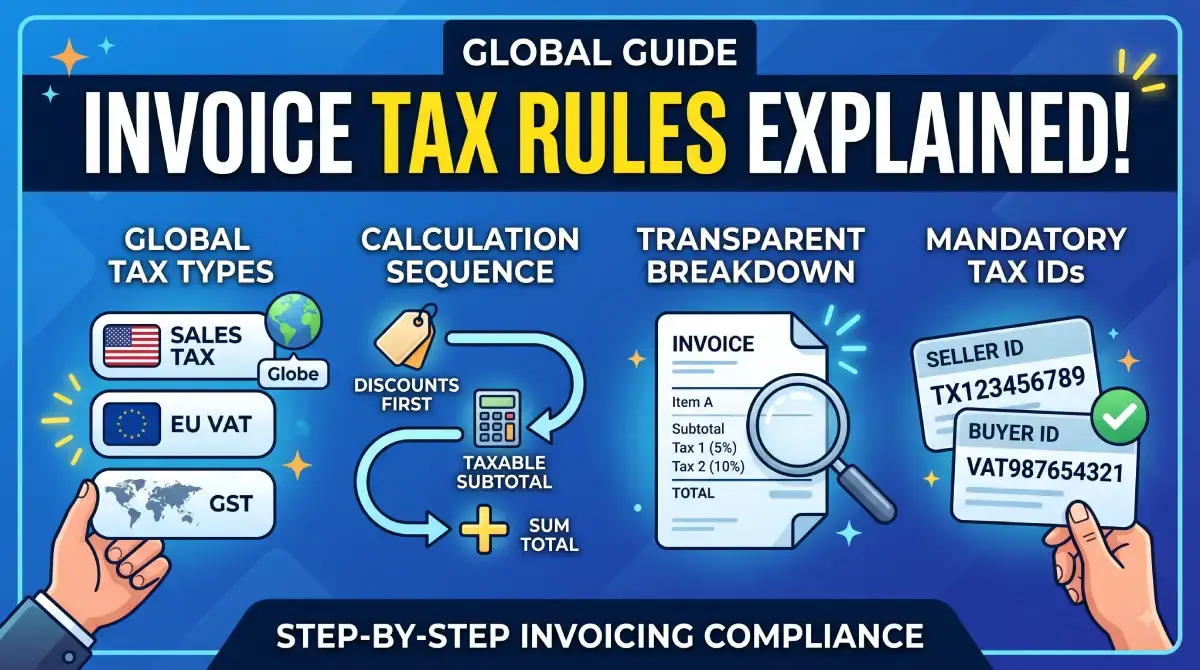
Navigating consumption taxes—whether called Sales Tax, Value Added Tax (VAT), or Goods and Services Tax (GST)—is a critical part of running a compliant business. Charging taxes incorrectly on your invoices can lead to compliance audits, client pushback, or out-of-pocket tax liabilities during filing season.
Adding taxes to digital invoices requires clear formatting that distinguishes between pre-tax totals, applied rates, and the final grand total.
Here is a straightforward guide on how consumption taxes work, how to calculate them, and how to format them on your invoices.
1. Key Differences Between Sales Tax, VAT, and GST
While all three are indirect consumption taxes collected from the buyer and remitted to tax authorities, their mechanics differ slightly:
Sales Tax (e.g., USA): Calculated only at the final point of sale to the end consumer. It is added to the subtotal as a flat percentage based on local state, county, or municipal rules.
VAT (e.g., European Union, UK): Assessed at each stage of the supply chain. Businesses charge VAT on sales (Output VAT) and reclaim VAT paid on business expenses (Input VAT).
GST (e.g., India, Australia, Canada): A comprehensive multi-stage tax structure that replaces multiple indirect taxes. B2B transactions often require specifying tax categories (e.g., CGST/SGST for intra-state or IGST for inter-state in India).
2. Step-by-Step: How to Add Tax to an Invoice
Step 1: Calculate the Pre-Tax Subtotal
Sum up the unit prices and quantities for all goods or services provided before applying any discounts or taxes.
$$\text{Subtotal} = \sum (\text{Quantity} \times \text{Unit Price}) - \text{Discounts}$$
Step 2: Apply the Correct Regional Tax Rate
Multiply the subtotal by the applicable tax percentage. If certain items are tax-exempt (e.g., zero-rated digital exports or essential services), calculate tax only on the taxable items.
$$\text{Tax Amount} = \text{Taxable Subtotal} \times \left(\frac{\text{Tax Rate \%}}{100}\right)$$
Step 3: Compute the Grand Total
Add the calculated tax amount to the subtotal:
$$\text{Grand Total} = \text{Subtotal} + \text{Tax Amount}$$
3. Sample Invoice Tax Breakdown
To maintain complete transparency for both your client and tax auditors, present the figures in a clean table format:
Item DescriptionQtyRateAmountTax RateTax AmountWeb Development Services1$2,000.00$2,000.0018% GST$360.00Cloud Hosting Setup1$500.00$500.0018% GST$90.00Subtotal$2,500.00Total GST (18%)$450.00Grand Total Due$2,950.00
4. Best Practices for Tax Formatting on Invoices
Display Tax Registration Numbers: Always list your official Tax ID (GSTIN, VAT ID, or State Tax Number) near your business name, as well as the buyer's Tax ID for B2B billing.
Never Embed Tax Silently: Avoid displaying a single lump sum without showing the underlying tax percentage and base price unless issuing an explicit tax-inclusive consumer receipt.
Handle Discounts Before Tax: Apply promotional discounts to line items before calculating the tax percentage to avoid overcharging tax.
"Add sub-totals, discounts, and tax rates effortlessly using the Invoice Serve Editor."
Miraj
8/12/2026
3 min
How to Invoice Across Borders: Handling Currencies and Cross-Border Taxes
Invoicing international clients opens up broad business opportunities, but it also introduces complexities like fluctuating foreign exchange rates, cross-border banking fees, and international tax compliance. Without clear agreements and proper invoice formatting, cross-border billing can quickly result in unexpected deductions and administrative delays.
Here is a practical guide on how to handle currencies, reduce payment friction, and format international invoices effectively.
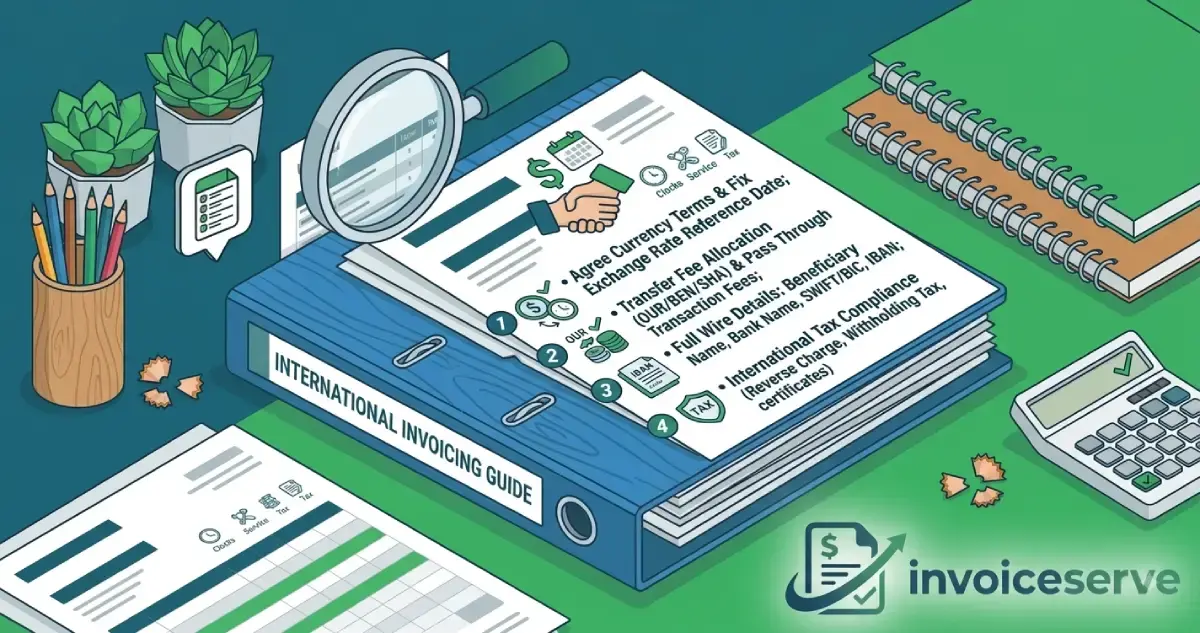
1. Establishing Currency Terms and Exchange Rates
Currency fluctuations can significantly impact your profit margins if not addressed upfront in your contract and invoice.
Agree on the Settlement Currency: State explicitly in your agreement whether the invoice will be settled in your local currency (e.g., USD) or the client’s local currency (e.g., EUR, GBP).
Fix the Exchange Rate Reference Date: If you bill in a foreign currency, specify which exchange rate will apply (e.g., "Converted based on the ECB exchange rate on the date of issuance").
Include Dual Currency Summaries: For clarity, display both the foreign transaction currency amount and your local home currency equivalent on the invoice.
2. Managing Cross-Border Banking Fees
International wire transfers (SWIFT) often pass through intermediary banks, each deducting handling fees. This frequently causes invoices to arrive underpaid.
Specify Intermediary Fee Allocation: Use SWIFT fee codes in your payment instructions:
OUR: The buyer pays all transfer fees. (Recommended for sellers)
BEN: The seller pays all transfer fees (deductions come out of the payout).
SHA: Shared transfer fees between buyer and seller.
Pass Through Transaction Fees: Clearly state in your billing terms that the client is responsible for covering all international transfer charges so you receive the full net amount.
3. Essential Banking Details for International Wire Transfers
Standard domestic bank account numbers are often insufficient for global transfers. Every international invoice should clearly list:
Account Holder Name & Physical Address: Exactly as registered with your bank.
Bank Name & SWIFT/BIC Code: The unique identifier for international bank routing.
IBAN / Account Number: International Bank Account Number (required for European and many global transactions).
Intermediary / Correspondent Bank Details: Required if your local bank does not process direct SWIFT transfers.
4. Handling Cross-Border Taxes & Reverse Charges
Tax rules vary depending on whether you are selling physical goods, digital services, or B2B consulting services internationally.
B2B Reverse Charge Mechanism (EU/UK): When invoicing businesses in the EU or UK from outside their tax jurisdiction, you generally do not charge local VAT/GST. Instead, include both parties' Tax IDs and note: "Services subject to the reverse charge mechanism."
Withholding Taxes (WHT): Some foreign jurisdictions require clients to withhold a portion of your invoice payment as tax. Request a tax withholding certificate from your client to claim tax credits in your home country.
"Specify foreign currency symbols and wire transfer details easily on the Free Invoice Generator."
Miraj
8/12/2026